

Category Archives: Entrepreneur

“Wrapping Up the Year” Checklist for Small Business

A quick glance at the calendar can send a shock of stress to the small business owner…how can it be the end of the year already? With so much screaming for your attention, it can feel overwhelming. Don’t worry, with a little organization you CAN get it all done. Follow our checklist to ensure everything is wrapped up nicely by the end of the year.

Team Member Management

  • Conduct end of the year team member reviews. Provide constructive feedback to your time-for-reviewteam members. Praise their successes. Encourage reflection on their struggles and setbacks. Ask if they are happy with the direction of their role, and if there’s anything you can help them with. Talk with them about their life apart from work. Do everything you can to support them and ensure they feel valued, both as your valued team member and as an individual.

  • Team member appreciation. Even a small gesture can make a big impact. Show your awesome team member(s) how much you value them. Give a holiday bonus, a thoughtful gift, a memorable holiday party.

Client Relations

  • Write a thank-you note to all your clients. A handwritten card or letter helps your business stand out in a world of mass emails. Express how much you value your clients, and how you look forward to working with them next year.
  • Assess every client’s worth to your organization. Evaluate whether it’s beneficial financial-recordsfor your business to move forward with every client relationship. Weigh a difficult client’s benefits against the time, emotional exhaustion, and stress required to deal with him or her. Sometimes it’s not worth the income. When the costs are too high, it’s better for you and the client to part ways.

  • Review financial records. Meet with your accountant to ensure your books are complete and up to date. Preliminary work now can save a huge amount of time come tax season (or in the event you get audited).
  • Conduct a profit and loss report. Put in writing the financial state of your business. It’ll be a good analysis of this year’s progress and serve as a benchmark when you make financial goals for next year.
  • Collect outstanding bills. Go through accounts and see which clients still owe money. If possible, get the payment before the year ends.
  • Review payroll. Make sure all accounts are covered and there are no outstanding payments. It’s easy to forget about bills such as transportation reimbursement, so double check to be sure everything’s taken care of.

Business Management

  • Backup all data. Save all your documents and contact information in the cloud or on an external hard drive. It’s tedious, but incredibly important.
  • Write an end of the year memo. This memo for your wonderful team members is two-fold. First, memocelebrate the past year. Highlight accomplishments and successes of the organization as a whole, and spotlight individuals who went above and beyond. Mention notable changes, like welcoming new staff members or new clients. It’ll be a good refresher for you and your team. Second, build up enthusiasm for the year to come. Talk about goals and the vision for the upcoming year to provide a concrete direction for the business.

  • Prioritize projects. Determine which projects need to be finished before the year’s ends. Tie up the loose ends for projects nearly completed, projects where it would be difficult to pause for the holidays, or projects for impatient clients. Set aside projects that can be easily started again after the holidays, or ones that benefit from a fresh perspective after the new year.

Self-Care

  • Really relax and rest. Entrepreneurs can be the worst at self-care! But burning yourself out is terrible for your health (and productivity!) Be sure to set aside time during the scramble to take care of yourself with massages, a night of Netflix, whatever you need to fully unwind and recharge.
  • Enjoy the holidays unplugged from work. By this point, you’ve done everything you need to do. Now enjoy your holidays!

If you need assistance accomplishing your end of the year administrative tasks, Alpine Small Business Solutions is here for you! We can handle short-term (or long-term) projects, freeing up your time to focus on other projects. Give us a call or shoot us an email today.


13 + Free Stock Image Websites for Startups and those on a Budget!

There are many costs and concerns to consider when starting a new business, but one that you may not think of is quality images. When building your website, writing a blog, or doing social posts for your business, you will want to add photos to jazz up the look. Imagery is a great way to add imagination and creativity to your website, blog, and social media, but, you need to make sure you are not using copyrighted material. Finding high-quality images  can take some time, but it is worth the time to present your business in a good light. (You can also hire a virtual assistant to take the time to find good images and present you with a few to choose from.)

As important as quality stock photos are for any business, you don’t have to spend an arm and a leg to get them. There are many sites that offer quality imagery that does not cost a thing. They may not always be exactly what you imagined, but you can often find something that will cover your needs at no-cost for your business.

Listed here are several sites that offer images with no charge and no issues with copy right. You can use these images for whatever you would like. Your online business manager may have others you can use as well.

Pixabay-logo.svg

Pixabay is a great tool for all your stock image needs. All images and videos on Pixabay are released free of copyrights under Creative Commons CC0. You may download, modify, distribute, and use them royalty-free for anything you like, even in commercial applications.

Stock Photos | Alpine Small Business Solutions

Morgue File contains free high-resolution digital stock photographs and reference images for corporate or public use. This site allows you to search for specific photos and has a very large archive. Be aware, there are links to other photos that you would have to pay for.

Stock Photos| Alpine Small Business Solutions

Unsplash is a great resource for high-resolutions photos. You must  subscribe to the site, but after you sign up, you get 10 new photos every 10 days.

gratisography

Gratisogroahy is a free high-resolution pictures you can use on your personal and commercial projects.

Stock photos | Alpine Small Business Solutions

Picjumbo is an easy-to-use site full of different categories of photos that are completely free for personal or commercial use.

Startup Stock Photos is an easy site that you can use all the photos from however you choose. It has an archive that you can browse through. The photos are high-quality but the site is relatively new so the archive is somewhat small still.

Freeimages

FreeImages is a free membership to resources for designers’ backgrounds, images, and photo collections.

Stock Photos | Alpine Small Business Solutions

Little Visuals is a subscription site. You get seven high-resolution images sent in a zipped file to you every seven days.

Stock Photos | Alpine Small Business Solutions

Life of Pix another site that allows you to use the photos however you choose with no copyright restrictions. They have a fairly large gallery that you can browse through different categories of photos.

kaboompics

Kabookpics is a Great place to get breathtaking Free Pictures for business or personal projects.

Stock Photos | Alpine Small Business Solutions

Death to the Stock Photo site is large and full of many different categories of photos. They send photos to you every month, but it does have an option to buy a subscription for premium options.

mmt

MMT Stock images are a free for commercial use photos by Jeffrey Betts.

sw-brandstack_dark_265x265

Snapwire connects mobile photographers with businesses and brands that need creative imagery. Authentic, Royalty-Free photos created just for you


Stock Photos | Alpine Small Business Solutions

SplitShire site is run by a photographer who was sick of trying to find quality images that didn’t cost a fortune. It has a premium option that sends all the photos right to your Drop Box, but the site is large and full of categorized photos all for free.

Stock Photos | Alpine Small Business Solutions

New Old Stock has many photos that are popular or fairly well known. This site works under “no known copyright restrictions.” This basically means that the copy rights have expired or aren’t likely to be enforced, but they take no liability for their use.

Stock photos | Alpine Small Business Solutions

RGBstock site requires registration, but is very large and full of photos that are categorized and have a search option available. The only restriction they have on the photos is that you can’t use them for anything in a resale form. In other words, you can’t print and sell their photos.

freepik1

Freepik offers users, high quality graphic designs: exclusive illustrations and graphic resources carefully selected by our design team in order to provide our users with great content that can be used in both personal and commercial projects.

Bonus site… because we all like surprises

all the free

AllTheFreeStock is the one place to find all the FREE Stock Images Stock VideosSound EffectsIcons & more.. Get all the Free Stock Images, Videos, Music and Icons in one location. All of the sites under [ Free Stock Photos ] offers images listed under the Creative Commons Zero license, so you are free to use these images in commercial projects. [ Free Stock Videos ], [ Free Sound Effects ] & [ Free Icons ] offer different licenses.

I am sure there are many more great sites out there that have quality images free of charge that can be used in your small business, however, your creative heart desires. Share your favorites with us in the comments below.

5 Reasons Why You Should be on the Google+ Social media Platform to Grow Your Online Business

Yes, I know…it is the next big thing…AGAIN! We have heard it several times that Google+ is going to be huge, yet you don’t use it or really even know what it is. So why do you want to be on it now?

Usually, you want to use social media outlets your target audience is active on. Not always. Insert Google+, the failed social media platform created by Google to compete with Facebook and Twitter. It comes and it goes without you ever really noticing. So why would I push you to be active on a failed platform? Sure, Google+ lacks the prevalence into popular culture that Facebook and Twitter can rightly brag about. But it offers unique benefits to marketers for growing your business, enough to justify the minimal time it takes to grow a thriving Google+ presence.

But first, what really is Google+?

g-1460601__180While Google+ is a unique social media platform, it can be helpful to think of it in terms of other more familiar platforms. It offers an easy way to curate and organization information (like Pinterest), the option to follow anyone without needing them to follow you back (like Twitter), and the ability to create a personal profile and a business page (like Facebook). Unlike other social media platforms that are relationship driven (connect with people you know), Google+ is more interest driven (connect with people who share similar ideas/interests). What really sets Google+ apart, though, is that it’s created by Google. And Google rewards users who consume their social media platform, resulting in the biggest benefit of Google+ being its SEO benefits.

Google+ SEO benefits

Google+ improves your SEO through a few ways. First, posts that are high in shares and +1 (the Google+ version of “likes” and “favorites”) rank higher in search results. So when you publish content high in shares and +1, that content is seen more by individuals and increases the chances they check out your website, become a customer, etc.

google-plus-1007069__180Second, through the use of Google+ Circles (similar to friending someone or liking a page on Facebook). If an individual is logged into Google and they added you to their Google+ Circle, your content is more likely to show up in their search results.

Third, your Google+ posts are immediately indexed into search results, translating into SEO benefits quicker than if you were to post the same content on another platform.

When your content shows up higher in search results, more people can discover your content. More eyes on your content means more visits to your website, more conversions into customers, etc. SEO is a crucial aspect of business building, and Google+ is a great way to strengthen your SEO.

While SEO is the biggest benefit to Google+, it is definitely not the only benefit.

Audience Segmentation

Google+ offers a feature called “Google+ Circles” which allows you to organize contacts into specialized groups. Each time you publish content, you get the option to only share with relevant group(s). This allows you to provide solid content specialized for individual users, providing them high benefit without oversaturating their feeds.

Target Audience Finding

google-plus-1183714__180Another great Google+ feature is “communities.” These are similar to Facebook groups. They are created by individuals and members within communities share and engage with content. Communities are categorized into different topics, such as football or photography. Posts are organized into sub-topics (for example, in a freelance writers’ group there are topics of marketing, writing tips, and writing tools) to help users sort through the high quantity of information.

Say you are a healthy food blogger. You can join communities such as healthy recipes or vegetarian eating. Individuals in these groups are targeted audiences who may want to consume your content and use your services. You can post regularly quality content (such as recipes) in hopes of directing members of the community to your blog. It’s applying the content marketing strategy (provide quality free content to be seen as an expert in your industry and increase the likelihood consumers will use your business when they need to buy a product/service) to a highly targeted audience. As a result, your content marketing efforts are more efficient.

Improving Your Knowledge

Communities aren’t just for you to share information-you can use them to gain knowledge too! First, you can improve the relevance and quality your content. See what types of content other similar businesses post to gain new ideas for blog posts. Find out what topics individuals respond to, and tailor your content to fit that. Second, you can join communities related to content marketing, social media, and the like to stay up-to-date with the latest marketing trends and tools.

Using Google+

Google+ offers many rich benefits to marketers who take advantage of it. If you’re really strapped for time, you can connect your Google+ account to Hootsuite and share every Facebook post to Google+ as well. If you’ve got more time, however, the recommended strategy is to treat Google+ as its own social media platform. The style of posts that resonate most with your audience on Google+ will be different than the posts that resonate with your audience on Facebook, Twitter, etc. You can take content you’ve already made (such as blog posts or newsletter copy) and share on Google+.

Ready to take advantage of Google+ but aren’t sure where to start? Alpine Small Business Solutions is here for you! We’d love to help you with Google+, or any aspect of small business building. Simply give us a call or shoot us an email today!

10 Hidden Gems in Facebook Personal Pages

Facebook is a fantastic invention-you already love it, but there’s a lot hidden beneath the surface. We’ve dug deep into Facebook to find the top 10 hidden secrets.

  1. Message Requests

Not every message that’s sent to you on Facebook shows up in your inbox. Messages sent by someone you are not friends with on Facebook go into a “message request” section.

To access these, click the chatat the top right of your screen. Then click “message requests” (to the right of “recent”).

  1. Save Button for Posts

Sometimes we find great content on Facebook . . . right when we have the least amount of time to actually read it. Never fear-the save button is here! The save button allows you to privately save links to read later.

If the post you want to save popped up on your news feed, simply click the to the right of the post and click “save”.

fb block

If you’re viewing the post from a page, click … and click “save.”

To view your saved posts, go to the left menu and click “saved” (or you can go to Facebook.com/saved).

fb block 2

When you want to delete a post, go to the “saved” posts section. Click “archive” at the top and click next to the post you want to remove, then click “delete.”

  1. Download Copy of FB Data

It’s no surprise that Facebook stores a lot of data on its consumers—A LOT. While you can’t stop Facebook from storing this data, you can access it (or at least some of it). Facebook allows users to download their information, which includes information you can see by using your account (such as posts you share and your activity log) and information you cannot see from your account (such as ads you’ve clicked on and IP addresses that are logged when you use Facebook).

Facebook provides a long list of what types of data is available in the downloaded information (which you can access here: https://www.facebook.com/help/405183566203254) but there are a few key subjects that may be of the most interest to people: searches you’ve made on Facebook, removed friends, pending friend requests, any friends apps or pages you’ve hidden from your news feed, list of people who follow you, and a list of topics that you may be targeted against based on your status likes interests and other timeline data.

To download the information, go into your settings section. Click “download a copy of your Facebook data” below your general account settings. Click “start my archive.” Depending on how long you have been on Facebook and how much you post, it may take a while, but they will email you when it is ready for you to view.

  1. Adding a Legacy Contact

While it’s uncomfortable to think about, it’s important to decide what you want to happen to your Facebook account when you pass away. Facebook provides two options: delete your account permanently or leave up the account and allow loved ones to share memories on it. For the later, you’ll need to designate a legacy contact. They’ll be able to write a pinned post (which can be used to provide memorial service information or share a message on your behalf), accept new friend requests from loved ones, and update the profile picture and cover photo. They will not be able to remove any friends, read your messages, change or remove past posts, or actually log into your account.

To add a legacy contact, log into your settings and click “security” and then “legacy contact.” Type in your designated contact’s name and click “add.” If you later decide you want to change the contact, you’ll be able to click on the contact and click “remove.” Then you can add your new legacy contact.

It’s difficult, but important, to think about what will happen when you pass on. If you run a business, be sure to check out our post on how to prepare your business for an unexpected life crisis: link to post here.

  1. Edit Ad Preferences

Ads can be annoying. Ads that relate absolutely nothing to your life or preferences are even more annoying. Fortunately, Facebook allows you to edit your ad preferences. Simply click (www.facebook.com/ads/preferences/edit/). The link will bring you to a page listing topics and sub-topics that Facebook picked based on your activities on and off Facebook. You’ll be able to delete irrelevant preferences, as well as add preferences from a set list of topics.

  1. Send and Receive Money Through Facebook

Yes, you read that right. You can now send money to people through Facebook Messenger without a charge! First, you need to add a debit card. Click “settings,” then click “payments,” then click “add new debit card.” Currently, the only way to pay through Messenger is debit. You can also add a PIN if you wish for an extra security measure (click “settings” then click “payments” then click “PIN”).

Once your debit account is activated in Messenger, you’re ready to send money. Create a message and click the $ icon and enter the payment amount. Click “pay” in the top right to send it.

fb block 3

To receive money for the first time, open the conversation and click “add card” in the message to add your debit card.

Just like with other transfers, it may take up to three business days for the banks to make the funds available.

  1. Embedding Posts

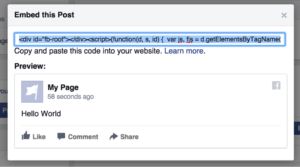
Did you know you can embed public Facebook posts onto your website? It’s simple and a great way to add visual content to your site. First, navigate to the post and click “embed post” from the drop down menu.

fb block 4

A box will pop up with a code, which you will need to copy and paste into your website.

fb block 5

Embedded posts are a great way to post testimonials, include examples, quote sources, show off your best content, and more!

  1. Friendship Pages

This feature was developed during a Facebook Hackathon. It is basically a timeline, but for a relationship instead of one person. It gathers all the communication (posts, replies, tagged photos, etc.) that involve you and a friend you choose, and places it all in the Friendship Page. You can view these posts, and even personalize the cover photo and profile picture.

To access the page, go to your friend’s profile and click and select “see friendship” from the dropdown.

  1. Play Chess With a Friend Through Messenger

Who doesn’t love a competition of intelligence and strategy between friends? Simply type “@fbchess play” into a conversation with a friend and Messenger will bring up a game of chess. To move type in the phrase “@fbchess” followed by the letter of the piece (K for king, Q for queen, B for bishop, N for knight, R for rook, and P for Pawn) and the letter and number of the location‑For example, “@fbchessPe4” would move a pawn to square E4. If you get confused, type in “@fbchess help.” If you wish to end a match, type in “@fbchess resign.” To pick which color to start with, type “@fbchess play white” or “@fbchess play black” (white goes first).

  1. Play Basketball With a Friend Through Messenger

Maybe chess isn’t your thing. How about a friendly basketball competition? Simply send a friend a basketball emoji and then click on the sent image to begin the game. The scores will be logged in the message feed so you can brag (or listen to bragging) easily.

To play the game, flick up on your phone to launch the ball into the hoop and try to get as many in as possible.

Facebook for personal use offers hours of endless entertainment, from dominating at a basketball game to reminiscing over old memories when viewing the Friendship Page. Facebook is a great tool for businesses as well. If you’d like help utilizing the benefits of Facebook for your business, simply call us or email us today! We are here to help with any aspect of business building, including social media marketing through Facebook.

Facebook Removes the 20% Text Rule

To the joy of marketers everywhere, Facebook finally altered the 20% text rule! This recent change will provide more flexibility and freedom to marketers, while likely impacting the ad experience for Facebook users. Below we break down some common questions about this recent change.

What was the rule before the change?

20%Previously, Facebook rejected ad requests where more than 20% of the image contained text. This caused frustration among marketers whose ads were rejected for containing just barely too much text, and for brands whose logo was text. Some arguably creative and effective ads were also rejected due to containing too much text.

Why did this rule exist if it caused so much frustration?

Facebook, as it repeatedly claims, is all about the user experience. Part of the user experience is the appearance and feel of the timeline. The line of thinking from Facebook went something like this… if ads appeared on timelines containing massive amounts of text, the timelines would appear cluttered and users would be less satisfied with the look of their timelines. Preventing advertisers from using too much text also helped push advertisers to make more creative ads that focused on “showing” rather than “telling,” since you rely on words to “tell.”

So with this change, can I now use as much text as I want on ads?


carrots-673201__180Marketers are now given the option to use photos in their ads that contain more than 20% text. No longer will beautiful ads be rejected for containing just a little bit too much text-marketers rejoice! The new change means Facebook will not stop advertisers from using an image simply because of an abundance of text (other restrictions, such as inappropriate images, still apply). However, Facebook still is pursuing the user experience as the priority. While it removed the “stick” form of motivation (punishing users for ads with too much text by preventing those ads from being published), it simultaneously implemented a “carrot” approach of motivation (providing an incentive to still use ads with minimal text). So even though it may not be a requirement, they still are going to make sure marketers keep limiting text at the top of their minds.

So, why would I still want to use ads with minimal text?

First, ads with too much text are not visually appealing. They make the photo appear cluttered and busy, two things you want to avoid because viewers will likely skip over it. Of course, there are exceptions where the cluttered and busy look is used to make a creative point, but generally speaking it’s a good idea to limit text from a graphic design standpoint.

thumbs upSecond, using too much text will negatively affect the amount of people who see your ad. Facebook has said that, given the same budget, ads with more text will reach a lower number of individuals than ads with less text. Hence the carrot again. They will motivate you to do what they like by giving you more views. Facebook won’t stop you from using too much text, but it makes it clear it is in the best interest of the marketer to continue using minimal text.


How will I know if my ad still uses too much text?

Images uploaded for ads will be placed into one of four categories. The one marketers should aim for is “image text: OK” because it will see no negative impact on reach. These photos contain no or minimal text. The next category “image text: low” sees a slightly limited ad reach. The third category “image text: medium” may see limited ad reach. The fourth category “image text: high” may not even reach the intended audience at all. When advertisers upload a photo in the grid tool, Facebook will let the user know which category the photo falls into.


Schedule Your Way to Holiday Cheer Part 1 of 3

ScheduleIt is that time of the year where the days are getting shorter and the to-do list keeps getting longer. It can be easy to get overwhelmed with how much you have to do, the time you want to take off, the gifts you needs to get, the school needs a volunteer, you have a holiday concert to go to, and so on with the never ending list of holiday festivities. At Alpine Small Business Solutions, we see it every year with clients trying to frantically clean everything off their desks before the end of the year or their annual leave. We have three main tips for you to keep the panic out of the holiday and make sure you are still on top of it all: Schedule, Organize, and Relax. We have a three-part blog series to help you make it to the end of the year and time off in a breeze when you use your online business manager.

Schedule

Begin early. I know we all don’t like the holidays running together. Halloween is displayed before school supplies are put up, Thanksgiving is sold out before trick or treating began, and Christmas has taken over the entire fall/winter season instead of just staying in December. Yes, it gets tiresome, but you should put this practice to use to make your holiday time go more smoothly. Start early and schedule everything you need to accomplish with plenty of advance. Remember, everyone is likely trying to do the same thing you are, and you don’t want to end up at the bottom of a long pile on someone’s desk.

Leave on time. Don’t stay late at work trying to get something else done; you will always find more things that need done and you are neglecting all your other to-dos.

scheduling help

Make a to-do list that is effective. Remember to focus on today and not every single task that has to be done sometime in the future. If you skip a task on your to-do list, it should get a higher priority the next day, and not everything should be in your “red” category—not everything can be an emergency, or there is no point of color coding.

To-do lists are a great way to keep projects organized not only when leaving for the holidays but also on a daily basis. In fact, I recommend taking 15 minutes at the end of each day to create a to-do list for the following day.

Schedule when you are going complete each to-do
item. 
A to-do list is a good start, but now it’s time to schedule when you will complete each task. If you have items that you need to delegate, book time to hand off the project. Treat each project as its own appointment. Honor that time and protect it from interruptions as you would time with a client.

A schedule is only good if you plan it and stick to it. You will keep yourself on track for your holiday fun. Next, watch for how to get organized to get out the door to family and fun.


2014 National Small Business Week

Honoring America’s Entrepreneurs: Small Business Owners DO Make a Difference

Let’s salute ourselves! We are the small business owners who dare to dream and create a company that we are passionate about. It’s often a difficult road and many people find it challenging to succeed, but with teamwork and dedication, the small business owners keep America strong. We provide an essential foundation and network for our communities!
May 12–16, 2014, has been proclaimed National Small Business Week by US President Barack Obama. The US Small Business Administration recognizes and highlights outstanding businesses and entrepreneurs from all 50 states. Important contributions of distinguished owners have been honored since 1963, when President John F. Kennedy first proclaimed the event.

The National Small Business Person of the Year, chosen from representatives across the country, will be awarded at the end of the week. In addition, the Phoenix award will be given to a public official, a business owner, and a volunteer involved with disaster recovery in a community.

Check out some of the amazing ways that small businesses make America strong.

  • 50 percent of Americans own a small business or work for one!
  • Small businesses create 2 out of 3 new jobs in the United States every year!
  • Small businesses drive innovation and increase global competiveness!

Alpine Small Business Solutions is proud to be part of the network of small business owners and is committed to continuing to offer a wide variety of professional services with our personal touch.

Here are some ways that you can help your business remain strong and creative in the coming years!

1. Delegate your routine tasks to a virtual assistant or online business manager.

2. Seek imaginative solutions with other creative people.

3. Add people to your team to expand your horizons.

4. Take time to interact with other small business owners.

5. Celebratethe passion that you bring to your business.

The publisher of SUCCESS magazine, Darren Hardy, says, “As any small business owner knows, entrepreneurship can be a rollercoaster ride of ups and downs, terrifying twists and turns. But they wouldn’t have it any other way. I believe we’re living in the greatest era of opportunity for entrepreneurs and National Small Business Week is a great example of that.”

We DO make a difference in the American way of life, for our families, our communities, our country, and the world. Alpine Small Business Solutions salutes all the small businesses and celebrates with you for everything that you bring to the business world. Thank you for your creativity and perseverance! Together, we are strong and growing!

Events will take place all over the United States honoring the small business. For additional information, visit http://www.sba.gov/nsbw/nsbw.

Denver has many events going on for Small Business Week. The city of Denver Office of Economic Development is sponsoring a series of small-business classes. For more information about Small Business Events in the Denver area go to www.denversbdc.org.

TUESDAY, MAY 25

ACCESS Opportunity with the City & County of Denver General Services/Purchasing Division, 9–11 a.m., 1445 Market St., 4th Floor Boardroom.

WEDNESDAY, MAY 26

National Healthcare Reform: How It Will Impact Your Small Business—8–11 a.m., Denver Metro Chamber of Commerce, 1445 Market St., 5th Floor.

THURSDAY, MAY 27

Road to Recovery—9 a.m. to 12:30 p.m., Kimbal Hall, 700 E. 24th Ave.
During these tough economic times, learn what your company can do to better position itself on the road to recovery.

San Francisco is on Monday, May 12, at Twitter headquarters and will be streamed on SBA.gov beginning at 11:40 am (Eastern). The event will discuss strategies to help small business owners learn how social media can be integrated into marketing strategies to help drive business growth.

Kansas City is on Tuesday, May 13, at Burns and McDonnell headquarters. The program includes “Are You Bankable: A Lender’s Perspective,” “Contracting with the Government,” and “From Small to Big: The Dynamics of Growing Your Business.”

Boston is on Thursday, May 15, at Microsoft New England R&D Center. Sessions are about online marketing strategies, rejuvenating your business, and finding capital for your business.

Washington, DC, is on Thursday and Friday, May 15–16, at the US Chamber of Commerce. The SBA will live stream several events, including speakers and award ceremonies for local and national business owners.

New York City is holding an event to help you promote your business into the mobile age. It is Wednesday, May 14, 2014 from 9:00 AM to 10:00 AM (EDT). You can attend in person or stream it from the Small Business Administration web page.

9 Ways a Virtual Assistant Can Stay Active & Fit While Being Desk Bound

woman-doing-exercise-front-her-laptopI love what I do for a living! I am blessed to get to work from my home office and be here when my kids go to school and when they get home from school.  Although, I try to live an active lifestyle, I am still desk bound most days.  Don’t get me wrong, being desk bound has given me so many great opportunities and has really elevated me to the next level in my Virtual Assistant and Online Business Manager Practice.  I absolutely love the thrill of being challenged by the tasks that I do while connecting with so many diverse people and helping guide entrepreneurs on ways they can lessen their load by delegating, automating, and systematizing their current processes.

Online Business Manager | Staying Fit While Being Deskbound

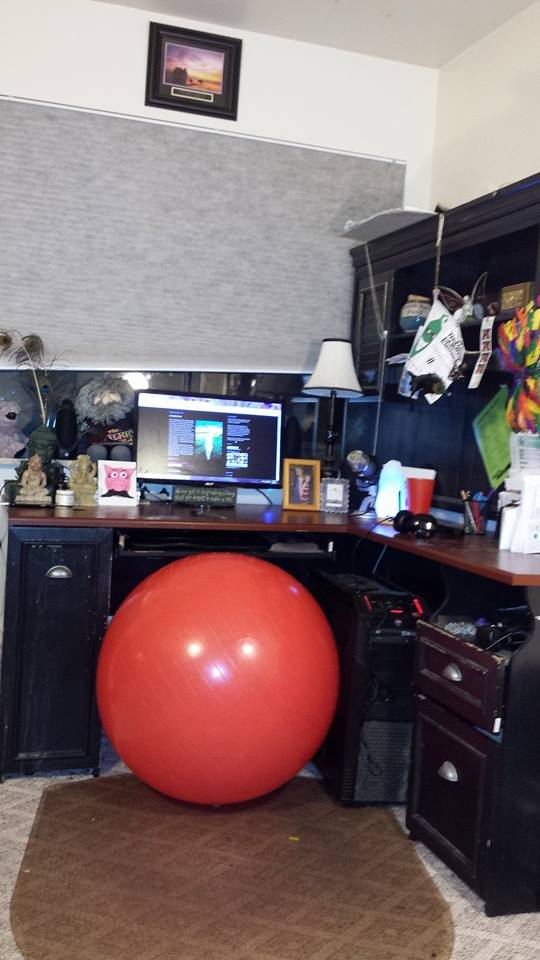
This is Jessica’s Home Office Set Up

As much as many of us love that we work from the comforts of our home, most of us don’t want to live an inactive lifestyle and be sedentary all day. Some people can delegate their work to be done by a virtual assistants or business managers to help reduce the hours in which they are completely desk bound.  If you are lucky enough to have a great team of virtual professionals, awesome, that means you are more apt to get out and enjoy a round of golf, an hour of exercise at the gym, a bike ride, a brisk walk….or some hula hooping. For others, it may be a little more difficult to get out and get active during working hours, so to stay fit, you often have to be creative and find ways to exercise and keep moving even if you are desk bound.

Here are 9 suggestions to incorporate fitness in to your daily work routine.

  1. Get an exercise ball instead of a chair. This will help with your core strength as you sit and balance. Choose a ball color that makes you happy, and this will stimulate your energy! Unlike sitting in a chair, sitting on an exercise ball engages your core muscles and helps improve balance and flexibility. Occasional bouncing can also help your body interact with gravity to a greater degree than sitting on a stationary chair, as well as being fun.
  2. Take a break at least once an hour. Stand up, stretch, bend over, twist your body, lift your legs—get the blood flowing. If possible, deliver messages directly to your coworkers versus sending an email, what a great excuse for a short walk. Or if you have a dog, take him for a romp around the block or at a nearby park. Research shows that simply standing up, about 35 times a day or so, will counteract the cardiovascular health risks associated with uninterrupted sitting. Standing up once every hour was more effective than walking on a treadmill for 15 minutes for cardiovascular and metabolic changes.
  3. Have a set of 5-pound weights handy. Several times per day, you can lift them over your head and swing them over your shoulder! Don’t allow your elbows to extend more than two inches behind your body. This exercise helps loosen your shoulder muscles and eases back tension. Strength training is an integral part of a well-rounded exercise program, and is recommended for both sexes and all ages. For every exercise that works the front of your body, be sure to do an exercise that targets the rear.
  4. Place a foot massager under your desk. These wooden bars will provide relaxation while helping exercise your lower body. You can use them with your shoes on, or, if it’s appropriate in your office, slip your shoes off for a great foot massage. This can be done without out anyone knowing you are even doing it.
  5. Reach for the sky! Also, reach way across the desk, reach for the wall, or reach for anything in any directions… just stretch and reach! Organize the layout of your office space in such a way that you have to stand up to reach oft-used files, the telephone, or your printer, rather than having everything within easy reach. Ideally, you’ll want to stand up at least once every 60 minutes, or more, so simply moving one or more things you frequently reach for could allow you to build this kind of movement in to your regular work day.
  6. Hold on to the edge…of your chair or desk, then push yourself up and away (be sure that the item you are pushing away from is sturdy and won’t slip). Make it an action that is similar to a pushup. Also, use the desk or chair to steady yourself as you bend over to touch the floor.
  7. Lift your legs. While seated you can march in place or make dance patterns. There are a series of moves you can do at your desk that will both release tension in your neck and back, as well as ease some of the day’s stress. You want to make sure you are keeping your blood moving.
  8. Fitbit Force | Fitness at DeskMotivational Fitness Gadget. Whether it is a Fitbit (that is what I have), a Bodybugg, a Nike Fuel, or similar, these nifty little gadgets are an  amazing way to help you with your motivation to get moving.  It gives you a visual of how much (or how little) you are actually moving during the day.  These devices can tell you all kinds of important information such as steps taken, distance traveled, calories burned, stairs climbed, and with my Fitbit it even analyses my sleep patterns.  They act as your very own personal trainer in a way.  These nifty wristbands will also allow you to set goals for yourself and track your progress across all of your devices, like your smartphone and tablet. One of the girls I work with also has a Fitbit, so we connect on there to keep our “friendly” competition going (which is great motivation) and to help remind the other to get away from the desk when she doesn’t have very many steps in for the day using the cheer or taunt feature that is build in.  I love it. 
  9. MyFitnessPal. This is an awesome tool, and it is free. I use it every single day.  It is a Calorie Counter & Diet Tracker.  They say that 70% of fitness and weight control is attributed to your diet. So tracking your food intake is super important to staying healthy and fit.  My Fitbit even syncs with Myfitness pal, so that I can be sure to track everything I am doing.  It also has a a large database of foods that you can select from, or if you are creating your own meals, you can download the app to your mobile devices and it will allow you to scan product labels for instant calorie counts. Another tool that I absolutely adore.   
  10. Bonus! I know I said I’d share 9 ways, but I have one more! Close your eyes; slowly rotate your head from side to side and back and forth. Think of your happy place and take a deep breath. In one minute, you’ll be refreshed and ready to resume your work!

Movement is Medicine | Staying Fit | Desk JobIf you need help, I strongly suggest setting a timer on your phone or your watch to alert you to take a break at least once an hour. You don’t have to stop working, just take a quick break to rejuvenate your mental and physical well being! And if you really need to just have something fun to do, take a look at this online site, compiled by Alpine Small Business Solutions: https://www.alpinesbsolutions.com/fun-stuff/. Great ideas!

What is a Google AdWords Campaign?

Online Business ManagerWorking with your business on the Internet should be easy, right? You just post a few things on your website, and the customers start rolling in! It’s so simple. Yes . . . but . . .

There are better ways for you to draw potential customers to your site with a quality pay-per-click (PPC) effective Google AdWords campaign. Your ad is written with specific keywords that are targeted to your company. When someone searches online for that word or phrase, your ad can appear, and people click on it to go to your website. This is a good thing!

For example, go to your Google home page. When you search for a specific word or phrase, there are ads on the right side of the page. Your goal is to have your ad at the top of the page, and to have it intrigue people, so they want to click on it!

This is one of the best ways for you to attract more customers. Your company only pays for the consumers who click through to your site. However, the more clicks, the lower your rate can be, and the higher on the page your ad appears.

How can you get there? By hiring an expert Virtual Assistant or Online Business Manager! You need the expertise and experience of a researcher and writer to create an ad that will be relevant and interesting to your specific customers. This ad can introduce your business and describe what you’re selling (new or different from what’s available through other sites). The ad is also a marketing tool to let people know what services you offer.

Google Ad Words | Virtual Assistant

Why would you want to try this on your own? If you broke a bone, you could maybe try to set it yourself, but chances are you’d prefer that someone with medical expertise take care of you. And if you needed the services of an electrician, you would probably want to hire someone with training and experience to complete the job in a skillful way.

So why not hire a person who knows what to do to get you optimal results with your Google AdWords marketing campaign? Hire an assistant or manager who knows how to explore your business and research the best keyword alternatives for search engine optimization (SEO) to make your ad outstanding. That’s imperative before the writing even begins!

The virtual assistOrganic SEO Managerant or business manager will focus on how your business is different and the best concept to attract people. This will get your business noticed! Then the quality of the ad will target specific relevant searches.

Additionally, your manager can track your ads, PPCs, and site visitors to provide you with ongoing feedback and current ideas for SEO. Let an expert handle the busy, time-consuming work of this important marketing tool, while you focus on what you do best!

To get a free report and consultation about your business, please contact Alpine Small Business Solutions at this site: https://www.alpinesbsolutions.com/seopreliminaryreport/.

A Female Entrepreneurs Journey to Success

Good things come to those who…???
A Female Entrepreneurs Journey to Success

As I continue to grow my own business and strive to meet new goals I look back at my journey and am proud of the path that I am on.  I sometimes wonder how I did it and often times scratch my head and am in awe of how far I have come in 12-years of being a small business owner.  I honestly can say I have worked my ass off as a Virtual Assistant and Business Development coach over the years.  I have helped countless entrepreneurs and small business delegate, grow and prosper, but I still seek balance.

But enough about me…let me ask you…When you think of a successful woman who does you think of?  Do you think of Hillary Clinton, Jennifer Anniston, Michelle Obama, or another famous name?

Does being famous mean you are successful or a legend? Sure, I suppose it does, but when I think of successful women I think of someone who can run a successful business empire and also achieve work/life balance.  A successful balancing act of success, family, love and fitness is what I consider SUCCESS!

So in honor of success and the journey to achieve it, I want to give a big VIRTUAL hug and high five to the top three female business owners of 2012.

The Top 3-Female Entrepreneurs of 2012

Sarah Fox has a degree in social work and initially started Krav Maga  as a hobby but has since became heavily involved in the sport and has trained to become an instructor. She says she has never worked so hard for something in her life but it doesn’t feel like a job because she loves it so much. Sarah has started from nothing and worked her way up to a comfortable, successful, life with Fight Fit. Keep moving forward, Sarah!


Rachel Kabb-Effron is a certified elder law attorney for Kabb Law Firm which is an elder law firm offering an integrated, elder-centered solution developed by a team that includes an attorney, a public benefits coordinator and a social worker. Rachel felt helpless when she was in college and her grandmother was in a nursing home, she knew this was a passion of hers and decided to turn that passion into something real. Rachel says that one shouldn’t judge success by what’s in the bank or not in the bank at any given time; do what you’re good at and what you love, and don’t worry about the money. We like the way Rachel thinks.


Darlene Campagna took over leadership at Direct Opinions and immediately began making changes. The team was a bit skeptical at first but then saw that the changes were working and the team was becoming stronger than ever. She cut weaknesses and focused on the capabilities and strengths of the team. Darlene says that one of the toughest lessons is learning to listen to your gut instincts; if your gut says something doesn’t feel right, it probably isn’t. She also says that being a small business she has the ability to choose which business’ to work with and which ones do not fit right and that there’s a comfort level that comes with that. We say, “Way to Go, Darlene!”

Did you Know

  • Women comprise 47% of the U.S. workforce from fashion to technical careers?
  • That successful Women entrepreneurs start their businesses as a second or third profession
  • Women start companies to better balance their work and family lives
  • Female-owned companies tend to offer more family-friendly benefit


WE ARE WOMAN HEAR US ROAR!